Leverage and Margin Explained Simply
What leverage and margin really mean, how much margin a trade needs, why your position size matters more than the leverage number, and how margin level and stop-out work.
Leverage lets you open a position worth more than the money you put down. The money you do put down is called margin. It is what makes it possible to trade a 3,000 USDT position with a few hundred USDT, and it is also the main reason traders lose money faster than they expect.
This lesson explains both ideas in plain numbers: how margin is calculated, what leverage does and does not change, how your account's margin level works, and what happens at stop-out on Traders Portal.
Open a trade on Traders Portal
Margin: the deposit behind a position
When you open a leveraged position, Traders Portal sets aside part of your balance as margin. Think of it as a good-faith deposit. You get it back when the position closes, plus or minus the profit or loss.
The formula is simple:
Margin required = position value ÷ leverage
The order panel shows this as Margin required before you confirm, along with Free margin after, which is what would be left for new trades and to absorb losses.
Leverage: what it does and does not change
Leverage is the ratio between the position value and the margin behind it. At 10x, each 100 USDT of margin holds a 1,000 USDT position.
Here is the key point: leverage does not change how much you make or lose per point. In the example above, a 1 ETH position gains or loses 1 USDT for every dollar ETH moves, at 5x, 10x or 20x. The panel's Value of $1 move row shows exactly that.
What leverage does change is how large a share of your margin each move represents. A 5% fall in ETH, from 3,000 to 2,850, costs (2,850 − 3,000) × 1 = −150 USDT in every case. Against 600 USDT of margin, that is 25%. Against 150 USDT of margin, it is 100%. The PnL (ROE) column in Open Positions shows this: ROE is your profit or loss as a percentage of the position's margin.
Your account: equity, free margin and margin level
On Traders Portal, all your positions share one pool of money. This is called cross margin: your whole account equity backs every position, and there is no separate, isolated pot per trade. Isolated vs Cross Margin explains the difference.
The client bar shows the numbers that matter:
- Balance: your cash, before open profit or loss.
- Equity: balance plus open profit or loss, including swaps, and any credit on the account.
- Used Margin: the margin locked by open positions. Pending orders also reserve margin as soon as you place them.
- Free Margin: what is left for new trades and to absorb losses.
- Margin Level: equity ÷ used margin, as a percentage.
Alerts and stop-out on Traders Portal
As your margin level falls, Traders Portal warns you twice: once at the warning level set for your account and again at the critical level set for your account. If it keeps falling to the stop-out level set for your account, the platform starts closing positions automatically. It closes the position with the largest loss first, one at a time, until the margin level recovers. This is called stop-out.
Traders Portal does not display a liquidation price. You can estimate the price that would trigger stop-out yourself: it is reached when your total losses have eaten through your equity down to the stop-out level of your used margin. Liquidation and Margin Calls covers what happens in detail.
Why position size matters more than the leverage number
Take the account above, and say, purely for illustration, that the stop-out level were 50%. Compare three ways of using it.
| Position | Leverage | Used margin | Loss from a 5% fall | Estimated stop-out price |
|---|---|---|---|---|
| 1 ETH (3,000 USDT) | 10x | 300 USDT | 150 USDT | about 2,150 |
| 1 ETH (3,000 USDT) | 20x | 150 USDT | 150 USDT | about 2,075 |
| 2 ETH (6,000 USDT) | 10x | 600 USDT | 300 USDT | about 2,650 |
The arithmetic for each row: stop-out happens when equity falls to 50% of used margin.
- 1 ETH at 10x: 50% × 300 = 150, so the account can lose 1,000 − 150 = 850. At 1 USDT per dollar, that is 3,000 − 850 = 2,150.
- 1 ETH at 20x: 50% × 150 = 75, so it can lose 925, giving 3,000 − 925 = 2,075.
- 2 ETH at 10x: 50% × 600 = 300, so it can lose 700. At 2 USDT per dollar, that is 700 ÷ 2 = 350, giving 3,000 − 350 = 2,650.
Doubling the leverage barely moved the stop-out price, because under cross margin your whole equity is the buffer. Doubling the size moved it far closer. Real stop-out prices also depend on spreads, fees, swaps and any other positions you hold.
Setting leverage on Traders Portal
- Open the leverage control
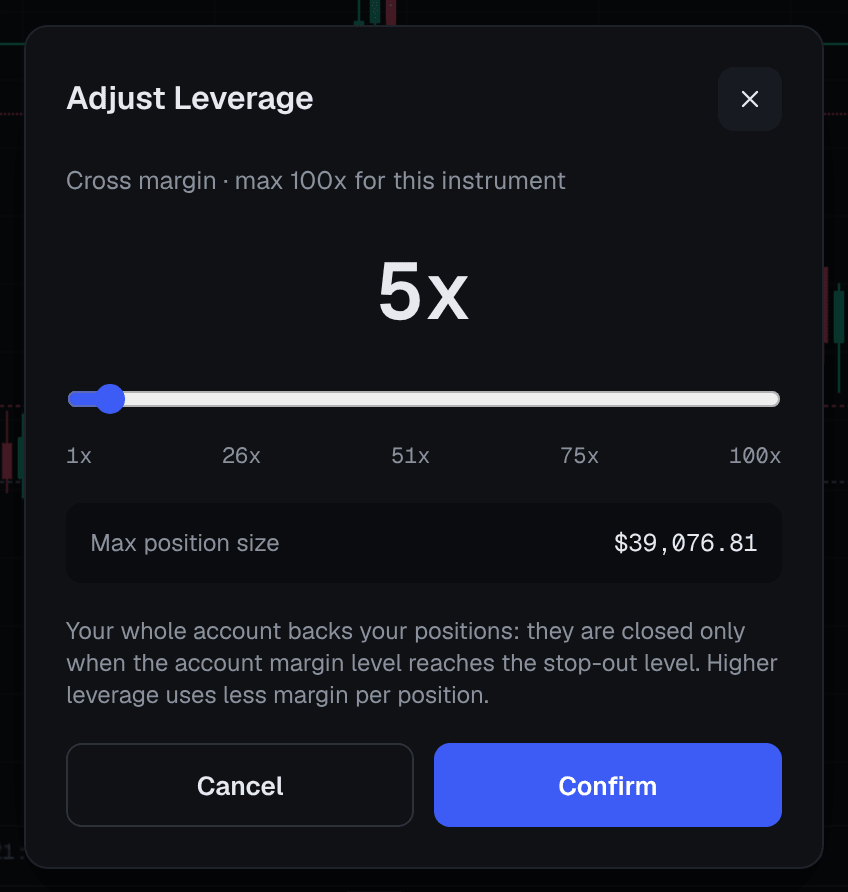
In the order panel, press the Leverage button, which shows the current setting, such as 10x. The Adjust Leverage slider opens.
- Choose a setting
Move the slider. Each market has its own cap, up to the maximum shown in the order panel for that market, and your account may have a lower one. You never have to use the maximum.
- Read the summary
Check Margin required, Free margin after and Value of $1 move before you confirm. Leverage applies to that order only.
Conclusion
Margin is the deposit that holds a position open, and leverage is how many times larger the position is than that deposit. Leverage decides how much margin a trade ties up; your position size decides how much you gain or lose per point. On Traders Portal, all positions share your account equity, alerts warn you as the margin level falls, and if it reaches the stop-out level set for your account the largest loser is closed first. Keep positions small relative to your equity, use a stop loss on every trade, and read the order summary before each click. Position Sizing shows how to turn this into a routine.
Related reading
FAQs
- What is the difference between leverage and margin?
- Margin is the money set aside from your account to hold a position. Leverage is how many times larger the position is than that margin. At 10x leverage, 100 USDT of margin holds a position worth 1,000 USDT.
- Does higher leverage mean bigger profits?
- Not by itself. Profit and loss depend on the position size and the price move. Higher leverage lets you open a bigger position with the same money, which magnifies losses exactly as much as gains.
- What happens if my margin level gets too low?
- You receive alerts when it reaches the warning and then the critical level. If it reaches the stop-out level, the platform closes your positions automatically, starting with the one with the largest loss, until the margin level recovers.
- Can I choose a different leverage for each trade?
- Yes. You set leverage for each order with the Leverage button in the order panel, up to the maximum allowed on that market. You can always choose less than the maximum.
- Does the platform show a liquidation price?
- No. It shows your margin level, free margin and margin used instead. You can estimate the price at which stop-out would happen yourself, as shown in the lessons on liquidation and margin.