Order Types Explained: Market, Limit, Stop
Market orders fill now, limit orders wait for a better price, and stop orders wait for the price to break through a level. Learn when each one fills and what it costs you.
When you press Buy or Sell, you are sending an order: an instruction that says how and when you want to trade. The most basic order fills straight away at the current price. Others wait until the price reaches a level you choose, so you can plan an entry in advance instead of reacting in the moment.
This lesson covers the three order types you will use on Traders Portal, market, limit and stop, explains exactly when each one fills, and shows what can go wrong with each. Once these make sense, stop losses and take profits, which are close relatives, will too.
Open a trade on Traders Portal
Market orders: fill me now
A market order asks for the best price available right now. On Traders Portal you place one on the Market tab of the order panel. A buy fills at the Ask and a sell fills at the Bid, which is why it helps to know how the spread works.
Market orders are simple and almost always fill. The trade-off is that you do not control the exact price. In a calm market the fill is very close to the price you saw. In a fast one, the price can move between your click and the fill. The difference is called slippage, and it can go against you or occasionally in your favor.
Use a market order when getting into or out of a trade matters more than the last few points of price.
Limit orders: only at this price or better
A limit order waits for a price that is better than the current one:
- A Buy Limit sits below the current Ask. It fills if the Ask falls to your price or lower.
- A Sell Limit sits above the current Bid. It fills if the Bid rises to your price or higher.
A limit order fills at your price or better. If the market jumps past your level, for example after a gap, you get the better price. The catch is that it may never fill at all: if the price turns back just before your level, you miss the trade.
Traders use limit orders to buy a pullback, sell into a rally, or enter at a level they have marked on the chart, such as the support and resistance zones covered in Support and Resistance.
Stop orders: once the price breaks through
A stop order waits for the price to move through a level in the direction of the trade:
- A Buy Stop sits above the current Ask. It triggers if the Ask rises to your price.
- A Sell Stop sits below the current Bid. It triggers if the Bid falls to your price.
Once triggered, a stop order fills at market. That makes it reliable, since it will fill, but not precise: in a fast move or after a gap, the fill can be worse than your stop price.
Traders use stop orders to join a move only once it gets going, often called trading a breakout or breakdown. The stop loss on an open position works on the same principle: it waits for the price to reach a level and then closes at market.
| Order | Placed | Fills when | Fill price | Typical idea |
|---|---|---|---|---|
| Buy Limit | Below the Ask | The Ask falls to your price | Your price or better | Buy a dip more cheaply |
| Sell Limit | Above the Bid | The Bid rises to your price | Your price or better | Sell into a rise |
| Buy Stop | Above the Ask | The Ask rises to your price | Market, can slip | Buy a breakout |
| Sell Stop | Below the Bid | The Bid falls to your price | Market, can slip | Sell a breakdown |
Worked examples
How Traders Portal chooses the order type for you
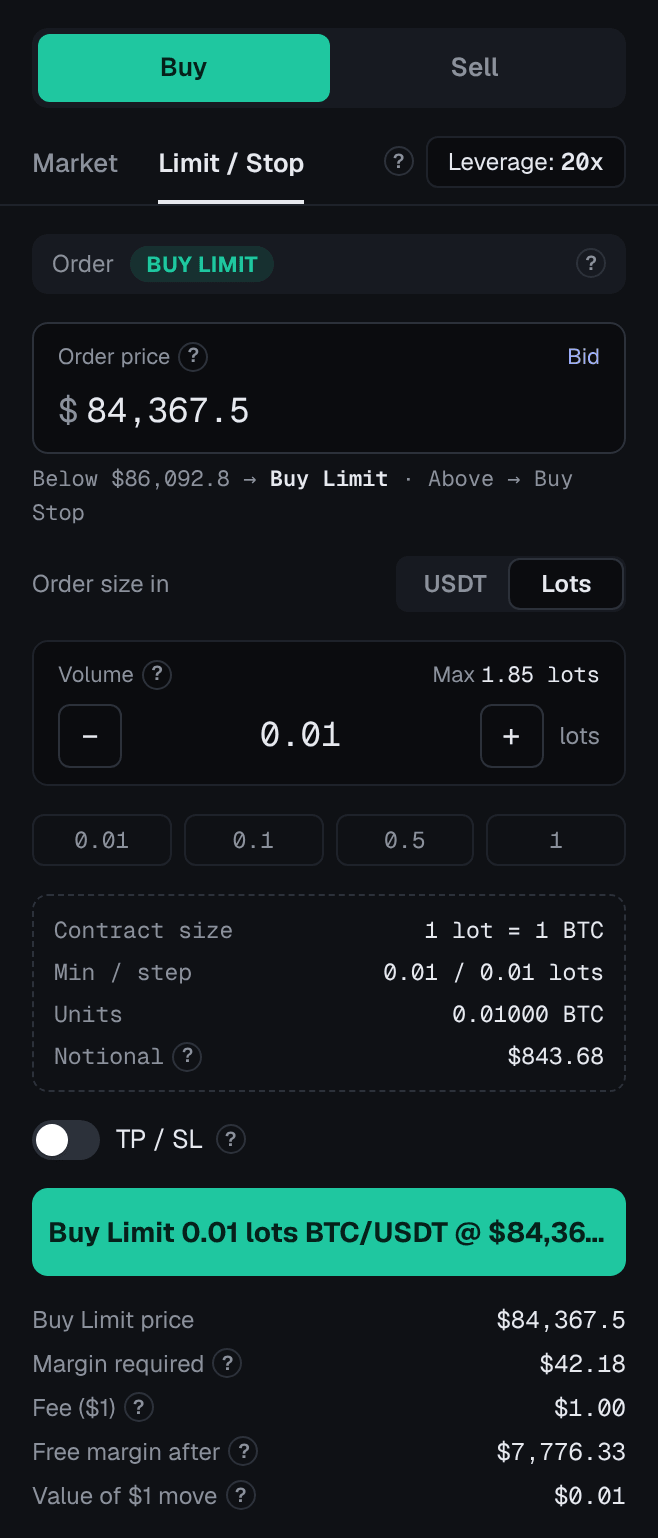
On Traders Portal you do not pick "limit" or "stop" from a list. You open the Limit / Stop tab, choose Buy or Sell, and type the price you want. The panel works out the type from where that price sits:
- Buy below the Ask: Buy Limit. Buy above the Ask: Buy Stop.
- Sell above the Bid: Sell Limit. Sell below the Bid: Sell Stop.
The order button always spells out what you are about to place, for example a Buy Limit at your price, so check it before you confirm. Stop-limit orders, which some platforms offer, are not available.
- Open the Limit / Stop tab
On the trade screen, for example BTC/USDT, choose Buy or Sell, then the Limit / Stop tab.
- Enter your price and size
Type the price you want, then the size in USDT or lots. Watch the label change between Limit and Stop as you move the price around the current Bid or Ask.
- Add TP / SL and leverage
Turn on TP / SL to attach a take profit and stop loss, and check the leverage on the Leverage button.
- Read the summary and confirm
Check Margin required, Fee and Free margin after, then confirm. The order appears in the Pending Orders tab until it fills or you cancel it.
Choosing between them
Ask yourself what matters most for this trade:
- Getting in now? Use a market order and accept the current price, plus possible slippage.
- Getting a specific price? Use a limit order and accept that it may never fill.
- Getting in only if the price proves itself? Use a stop order and accept that the fill may slip.
Conclusion
A market order fills now at the current Ask or Bid. A limit order waits for a better price and fills there or better, if it fills at all. A stop order waits for the price to break through a level and then fills at market, so it can slip. On Traders Portal, the Limit / Stop tab chooses the type from the price you enter, and every pending order reserves margin until it fills or you cancel it. Next, Stop Loss and Take Profit shows how the same ideas protect a position once it is open.
Related reading
FAQs
- What is the difference between a limit order and a stop order?
- A limit order waits for a better price than now: below the current price for a buy, above it for a sell. A stop order waits for the price to move through a level in the direction of the trade: above the current price for a buy, below it for a sell.
- Will my limit order always fill at my price?
- A limit order fills at your price or better, but only if the market reaches it. If the price never gets there, the order never fills and stays pending until you cancel it.
- Why did my stop order fill at a different price?
- Once a stop order's price is reached, it fills at the next available market price. In a fast market or after a gap that can be worse than the level you set, which is called slippage.
- Does a pending order use margin before it fills?
- Yes. On the platform, a Limit or Stop order reserves its margin as soon as you place it, which reduces your free margin. Canceling the order releases it.
- Can I place a stop-limit order?
- Not on the platform. You can place market orders, limit orders and stop orders, and attach a take profit and a stop loss to each one.