Margin, Leverage and Liquidation Price on Traders Portal
How leverage, margin required and margin level work on Traders Portal, what happens at stop-out under cross margin, and how to estimate your own liquidation price.
Leverage lets you open a position worth more than the money you put up. Margin is the part of your money set aside to hold that position. On Traders Portal you see both on screen: the Leverage button and Margin required in the order panel, and Margin Level in the client bar.
What you will not see is a liquidation price, the price at which your position would be closed automatically. This guide explains each number, the alert and stop-out rules, and how to estimate that price yourself, with every step worked through in USDT.
Open a trade on Traders Portal
Choosing leverage
- Open the leverage control
In the order panel, press Leverage: Nx. The Adjust Leverage slider opens.
- Pick a level
Drag the slider. It goes up to the maximum shown in the order panel for that market, and your account may have a lower cap.
- Watch the summary change
Margin required and Free margin after update as you move the slider. Value of $1 move does not, because it depends only on your size.
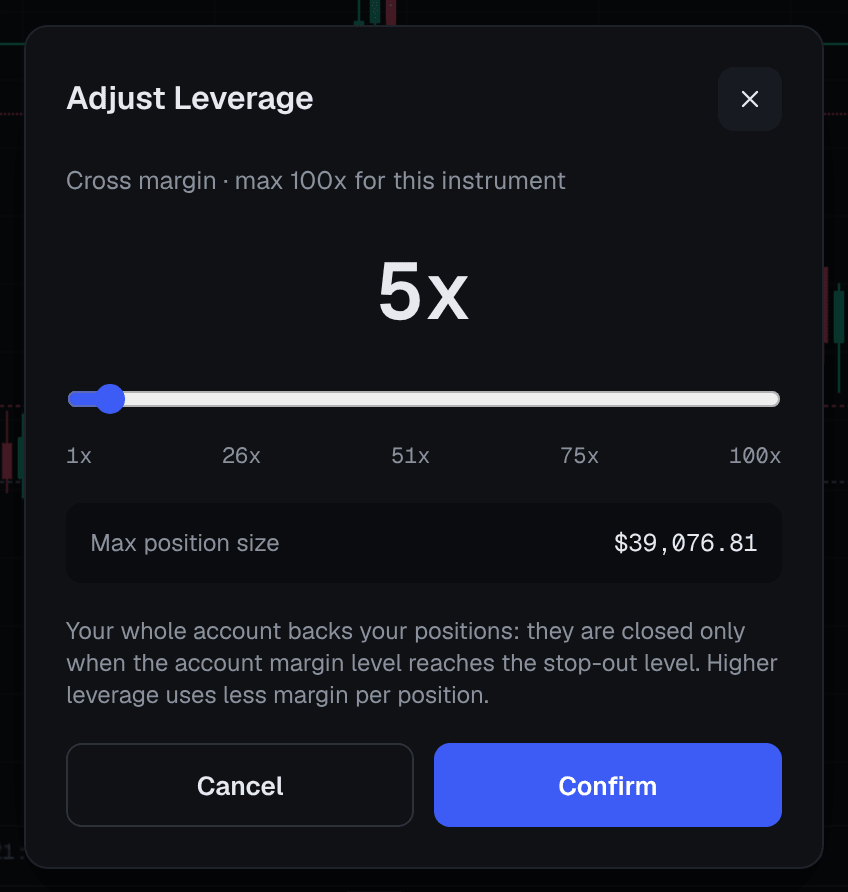
Margin required: what leverage changes and what it doesn't
Leverage changes how much margin is locked. It does not change what each price move is worth; your size does that. The real danger of high leverage is that it lets a small account open a large position.
Cross margin: one pool behind every position
Traders Portal uses cross margin only. All your equity stands behind all your positions. A profit on one trade can support a loss on another, but a large loss on one trade can also lead to others being closed. There is no isolated mode that ring-fences a single position. Isolated vs Cross Margin compares the two models.
Hedging is allowed: you can hold a buy and a sell in the same market at once. For the matched volume, the panel shows Margin required (hedged).
Margin level, alerts and stop-out
The client bar shows Equity, Open P/L, Balance, Free Margin, Used Margin and Margin Level, where:
- Equity = balance + credit + unrealized profit or loss, including swap.
- Margin Level = equity ÷ used margin, shown as a percentage.
| Margin level | What happens |
|---|---|
| Well above the warning level | Normal trading |
| At the warning level set for your account | Warning alert |
| At the critical level set for your account | Critical alert |
| At the stop-out level set for your account | Stop-out: the position with the largest loss is closed, then the next, one at a time, until the level recovers |

Here the trade that caused the problem is the one closed, but under cross margin a big enough loss on one position can also put others at risk.
Estimating your stop-out price
There is no liquidation price on screen because, under cross margin, it depends on everything in your account at once. With one position, or one dominant position, you can estimate it from numbers you can see:
- Find the stop-out threshold
Multiply Used Margin by the stop-out level. That is the equity at which stop-out begins.
- Work out your room
Subtract that threshold from your current Equity. This is how much you can lose before stop-out.
- Turn room into a price distance
Divide the room by the position's Value of $1 move, shown in the order summary when you opened it. For markets priced in USDT it equals the units you hold, such as 0.1 BTC or 2 ounces of gold.
- Apply it to the closing price
For a buy, subtract the distance from the current Bid. For a sell, add it to the current Ask.
| Position | Margin used | Room | Estimated stop-out |
|---|---|---|---|
| 0.1 BTC at 5x | 1,200 | 400 | about 56,000 |
| 0.1 BTC at 10x | 600 | 700 | about 53,000 |
| 0.1 BTC at 20x | 300 | 850 | about 51,500 |
| 0.05 BTC at 10x | 300 | 850 | about 43,000 |
Notice the last row. Halving the position moves the estimate far more than any leverage setting, because each 1,000-dollar move now costs only 50 USDT. Size, compared with your equity, is what drives your risk.
Treat the result as an estimate. It ignores the spread, fees and swap, and with several positions the largest loss is closed first, which changes the picture. Fast markets and gaps can also jump straight past it.
Keeping a safe buffer
- Put your stop loss well before your stop-out price. In the example above, a stop at 57,500 would close the trade long before 53,000.
- Keep free margin. Every new position and pending order reduces it.
- Don't add to losing trades to "average down"; under cross margin it pulls the whole account closer to stop-out.
- Recheck after every new trade, because each one moves the stop-out price of the others.
Traders Portal writes off a negative cash balance once no positions are open, but you should never rely on that as a plan.
For the general theory, see Leverage and Margin Explained Simply and Liquidation and Margin Calls.
Conclusion
On Traders Portal, leverage sets how much margin a position locks, margin level measures your equity against that margin, and when it reaches the stop-out level set for your account, stop-out closes the largest losing position first. Because margin is shared, no liquidation price is shown, but you can estimate one from Equity, Used Margin and Value of $1 move. Keep positions small relative to your equity and your stop loss well clear of that estimate.
Related reading
FAQs
- Why doesn't Traders Portal show a liquidation price?
- Under cross margin, every position shares the same account equity, so the price at which stop-out happens depends on your balance and all your positions together, and it shifts as they move. The platform shows Margin Level and Free Margin instead, and you can estimate a stop-out price from those figures.
- Does lower leverage make a trade safer?
- Leverage alone does not change how much you gain or lose for each $1 the price moves; position size does. Lower leverage mainly limits how large a position your free margin allows. For a position of a given size, safety comes from its size compared with your equity, and from your stop loss.
- What happens at the stop-out level?
- When your margin level reaches the stop-out level set for your account, the platform closes the position with the largest loss first. It then checks again and closes positions one at a time until the margin level recovers.
- Can I use isolated margin on Traders Portal?
- No. Traders Portal uses cross margin only, so your whole account equity backs every open position.
- Do pending orders affect my margin?
- Yes. A Limit or Stop order reserves margin as soon as it is placed, which reduces your free margin before the order has filled.