Withdrawals, Fees and Account Security on Traders Portal
How to withdraw from Traders Portal by crypto, bank wire or card refund, what must be in place first, which fees apply, and the security settings that protect your money.
Getting money out matters as much as getting it in. On Traders Portal, withdrawals are requested from Account → Withdraw and go through a short review before they are paid. A handful of rules decide whether a request can go through: verification, a saved destination, your 2FA code and your free margin. Knowing them in advance avoids most surprises.
This guide covers the withdrawal steps, the costs to expect, and the security settings that keep your money yours.
Before you withdraw: four checks
- Verification approved. Your identity check must be complete. See Account Setup, Verification and Deposits if it is not.
- A saved destination. Withdrawals go to a destination you have saved, such as a wallet address or bank account. A new destination can be used as soon as you save it.
- Your 2FA code. If two-factor authentication is on, you enter a code from your authenticator app.
- Enough free margin. Only free margin can be withdrawn: equity minus the margin used by open positions and reserved by pending orders.
Withdrawal methods
| Method | Options | Worth knowing |
|---|---|---|
| Crypto | USDT on TRC20, USDT on ERC20, BTC, ETH | BEP20 is for deposits only; match the network your receiving wallet expects |
| Bank wire | USD, EUR or GBP | Your bank or intermediary banks may charge their own fees |
| Card refund | Back to a card you used for a deposit | Only cards that funded the account can receive a refund |
How to withdraw, step by step
- Open the Withdraw page
Go to Account → Withdraw, choose Withdraw from the account menu, or open the Withdraw page directly.
- Choose a method
Pick crypto, bank wire or card refund, and for crypto the asset and network.
- Choose a saved destination
Select a wallet address, bank account or card you have already saved. If you add a new one now, you can use it straight away.
- Enter the amount
Enter an amount of at least the minimum shown on the Withdraw page and no more than your free margin. Before you continue, check the fee for your method.
- Confirm with 2FA and submit
Enter the code from your authenticator app if 2FA is on, then submit the request.
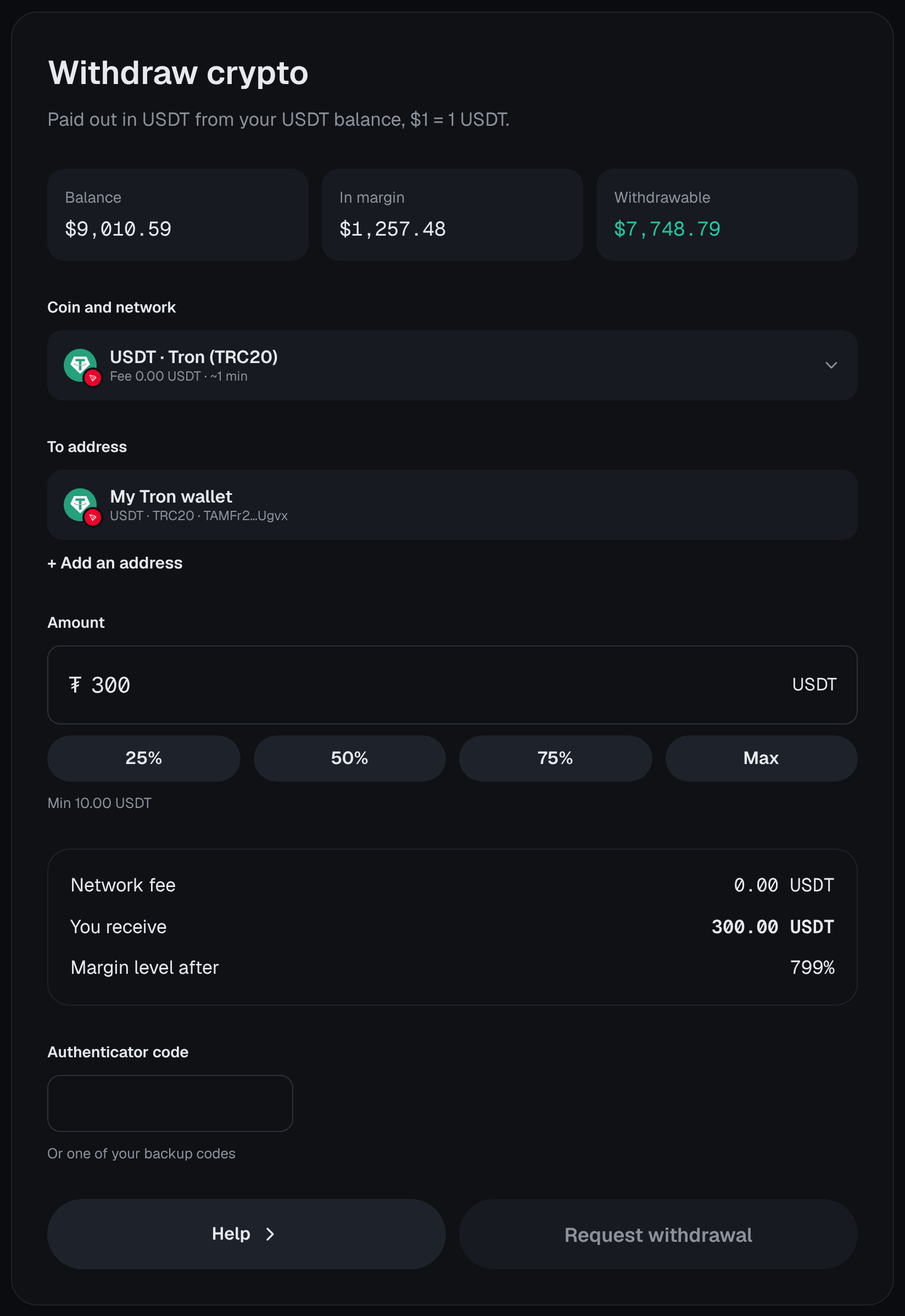
For crypto, copy your receiving address from your own wallet rather than typing it, and check the network matches. A withdrawal sent to an address on the wrong network can be lost.
Tracking your request
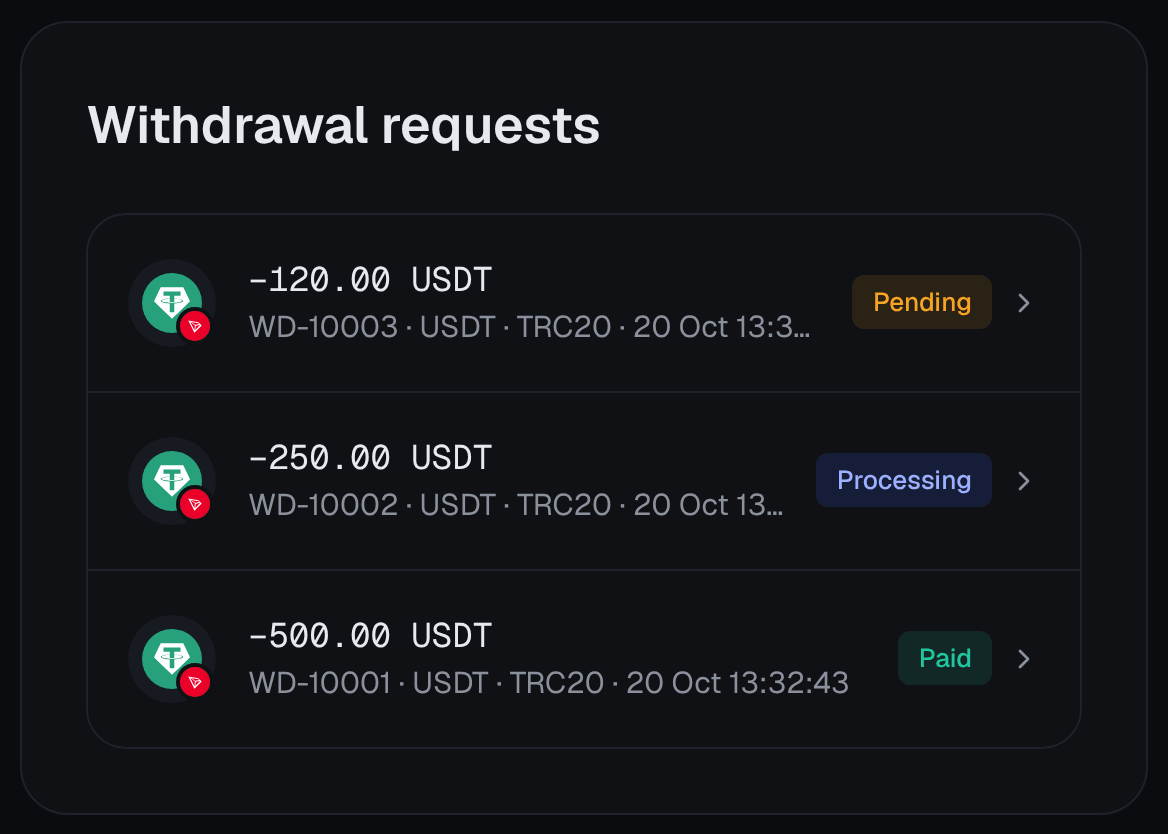
Each request moves through four statuses: pending, under review, processing and paid. Allow the processing time shown on the Withdraw page, plus any time the blockchain or your bank needs once the payment has left.
If you have an active bonus, making a withdrawal ends it. Check the bonus terms before you request one.
If a withdrawal is held up
Most delays have a simple cause. Check these before contacting support:
- Verification. A document may have expired or been rejected; look at the KYC tab under Personal Information.
- The destination. The saved address or account was removed, or its coin and network are no longer offered for withdrawals.
- The amount. It is below the minimum, or above your free margin because open positions have moved against you since you started.
- The card. Card refunds can only go back to a card that was used for a deposit.
- The network. For crypto, make sure the network you chose is one your receiving wallet supports.
If none of these applies, contact support from Account → Support with the request's amount, method and date. Support will never need your password or 2FA codes to help.
Fees: what to expect
Two kinds of cost matter here. On the way out you pay the fee shown on the Withdraw page, and each request must be at least the minimum shown on the Withdraw page; both can differ by method. Banks and blockchains can add their own charges on top, so the amount that arrives may be a little lower than the amount you requested.
While you trade, the costs are the spread (the gap between Bid and Ask), the trade fee (the fee shown in the order panel before you confirm) and the daily swap on positions held past the daily swap time shown in the market details. The Fees and Swap columns in Closed Positions show what each trade actually cost. Funding, Swaps and Trading Costs explains each one with examples.
Securing your account
Your security settings protect withdrawals as much as logins. Start with two-factor authentication (2FA): a second code from an app on your phone, needed as well as your password.
- Open Security
Go to Account → Personal information → Security.
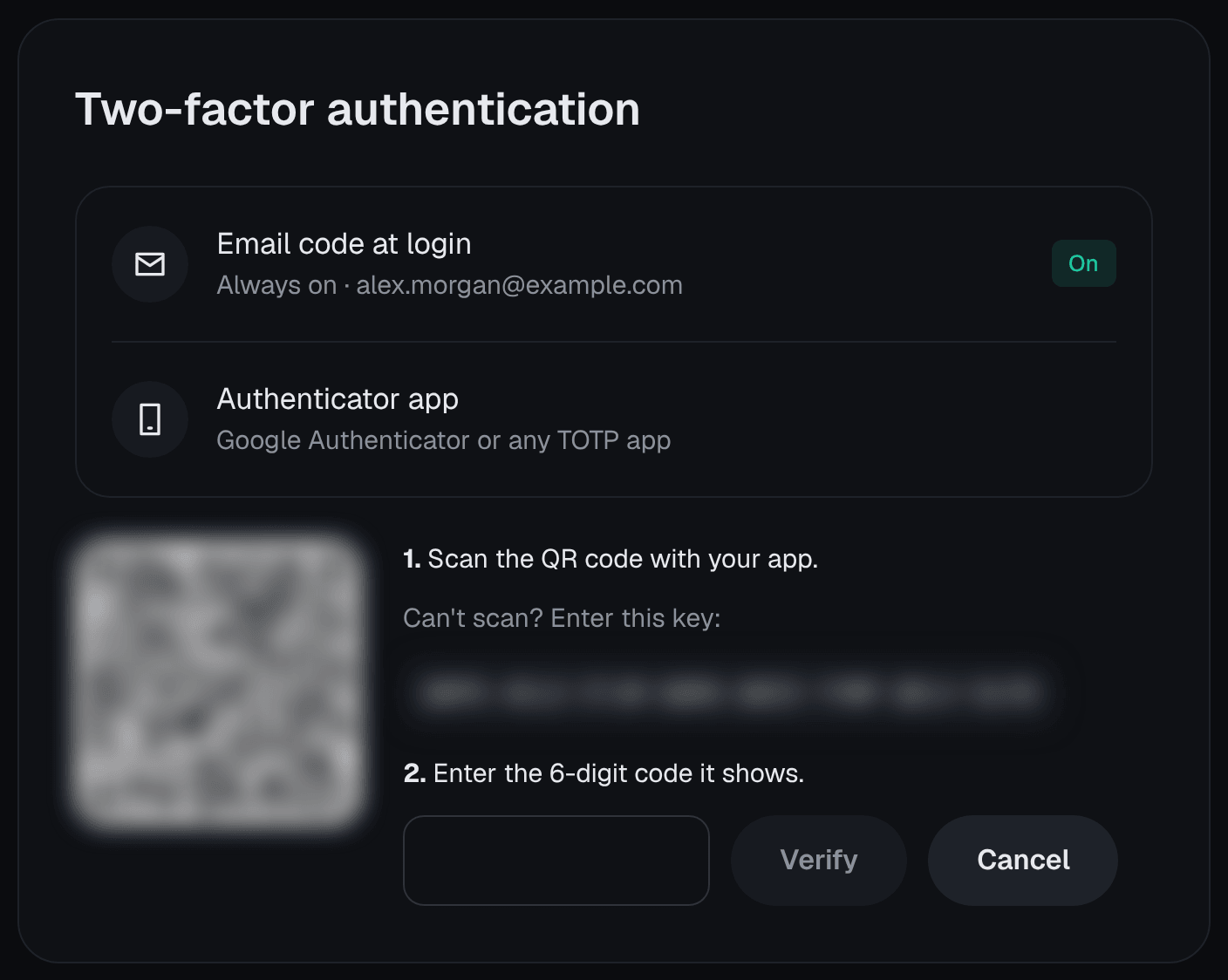
- Scan the QR code
Scan the QR code with an authenticator app on your phone.
- Enter the code to confirm
Type the code the app shows to switch 2FA on.
- Save your backup codes
Store the 10 backup codes somewhere safe and offline. Each can replace an app code if you lose your phone.
A few more protections are worth knowing:
- Passwords need at least 8 characters with an upper-case letter, a lower-case letter and a digit. Changing your password signs out your other sessions.
- Password reset links expire after 30 minutes.
- New sign-in alerts tell you when someone signs in from a browser Traders Portal has not seen before. If it was not you, change your password straight away.
Conclusion
Withdrawing from Traders Portal is straightforward once four things are in place: approved verification, a saved destination, your 2FA code and enough free margin. Check the fee, minimum and processing time on the Withdraw page, follow the request from pending to paid, and leave a margin buffer if positions are still open. Turn on 2FA, keep your backup codes offline, and never share your codes or password with anyone.
Related reading
FAQs
- Why can't I withdraw my full balance?
- Only free margin can be withdrawn. Margin used by open positions and reserved by pending orders stays locked, and losses on open positions reduce what is free.
- Can I use a newly added withdrawal address straight away?
- Yes. A new wallet address, bank account or card can be used as soon as you save it. We email you every time one is added, so you can react at once if it was not you.
- Can I withdraw USDT on the BEP20 network?
- No. BEP20 is available for deposits but not for withdrawals. Crypto withdrawals are offered in USDT on TRC20 or ERC20, and in BTC and ETH.
- How long does a withdrawal take?
- Requests move through pending, under review, processing and paid. Allow the processing time shown on the Withdraw page, plus any time your bank or the blockchain needs to complete the transfer.
- Will Traders Portal staff ever ask for my password or 2FA code?
- No. Staff never need your password or 2FA codes. Treat anyone who asks for them, by email, chat or phone, as a scammer, and contact support through your account instead.
- What if I lose the phone with my authenticator app?
- That is what your 10 backup codes are for: each can be used in place of an authenticator code. Keep them offline and separate from your phone, and contact support from your account if you have lost both.